
Despite meticulous efforts in publishing engaging content, optimizing titles, and even securing valuable backlinks, many website administrators find their WordPress sites struggling to attract anticipated organic traffic. A frequently overlooked yet critical factor contributing to this stagnation is the presence of "orphan pages" – content existing within a website’s database but isolated from its internal linking structure. These pages are largely invisible to both site visitors and search engine crawlers, severely impeding their discoverability and ranking potential. While often missed, the resolution for this widespread SEO challenge is more straightforward than typically perceived. This article delves into the precise methodology for identifying and rectifying orphan pages across a WordPress platform, thereby revitalizing a site’s search engine optimization performance.
Understanding the Phenomenon of Orphan Pages
An orphan page is fundamentally any page on a website that lacks internal links from other pages within the same domain. Conceptually, it can be likened to a room within a large building for which no connecting hallways exist; the room is present, but inaccessible. This isolation renders the content effectively hidden, preventing both human users and automated search engine bots from navigating to it. Without internal pathways, these pages fail to accumulate "link equity" – the authority and value passed between pages through internal links – which is crucial for search engine ranking.
Genesis of Orphan Pages: Common Causes
The emergence of orphan pages is often an unintentional byproduct of common website management practices. Several scenarios frequently lead to their creation:
- Pages Never Integrated into Site Structure: A common occurrence is publishing new content without subsequently linking it from the main navigation menu, category pages, relevant blog posts, or other existing content. Such pages reside in the site’s database but remain disconnected from the broader informational architecture.
- Site Migrations and Restructuring Errors: The process of migrating a website to a new platform or undergoing significant URL restructuring can inadvertently break existing internal links. If 301 redirects are not properly implemented or link updates are missed, pages can become isolated from the rest of the site.
- Gradual Link Removal: Over time, as website navigation menus are updated, content is revised, or old posts are archived, internal links pointing to specific pages can be removed without new connections being established. What was once a well-integrated page can thus become orphaned.
- Campaign Landing Pages Left Unmanaged: Pages specifically created for time-sensitive marketing campaigns, such as paid advertisements or promotions, are frequently designed outside the main site navigation. Once the campaign concludes, these pages often remain isolated, never integrated into the enduring site structure.
It is important to acknowledge that some pages, such as landing pages for specific ad campaigns or content undergoing testing, are intentionally created as orphans. However, even these require careful management to prevent negative SEO implications, which will be discussed further.
The Detrimental Impact on WordPress SEO
The adverse effects of orphan pages on a website’s WordPress SEO are multifaceted and significant. Search engines, notably Google, rely heavily on internal links as a primary mechanism for discovering, crawling, and evaluating the relevance and importance of content. When a page is devoid of internal links, search engines have diminished incentive to visit, crawl, or ultimately rank it.
The practical implications of this include:
- Reduced Discoverability and Indexing: Search engine crawlers primarily navigate websites by following links. An orphan page, lacking these links, is less likely to be discovered and subsequently indexed. Without indexing, a page cannot appear in search results, regardless of its quality.
- Loss of Link Equity: Internal links are instrumental in distributing PageRank (link equity) throughout a website. A page without incoming internal links receives no such equity, diminishing its perceived authority and making it significantly harder to rank for target keywords.
- Suboptimal User Experience (UX): From a user’s perspective, orphan pages represent dead ends. Visitors cannot easily navigate to them, and once on such a page (perhaps via a direct link), they have no clear pathways to explore related content, leading to frustration and higher bounce rates.
- Wasted Crawl Budget: For larger websites, search engines allocate a "crawl budget" – a finite amount of resources to crawl a site within a given period. Orphan pages, if eventually discovered (e.g., via XML sitemaps but without internal links), can consume this budget inefficiently, diverting crawlers from more valuable, well-linked content.
- Signaling Poor Site Structure: A website replete with disconnected pages can signal to search engines a disorganized or poorly managed site architecture. This can negatively impact the overall domain authority and potentially affect the rankings of even well-linked pages.
The collective impact can be substantial, leading to missed traffic opportunities, diminished keyword rankings, and a failure to capitalize on content investment.
Leveraging AIOSEO for Orphan Page Resolution: A Step-by-Step Guide
Addressing orphan pages systematically requires robust tools. All In One SEO (AIOSEO) emerges as a highly recommended solution, offering a "Link Assistant" feature specifically designed for this purpose. AIOSEO is a widely trusted WordPress SEO plugin, utilized for optimizing various critical SEO elements from titles and OpenGraph settings to schema markup. Its continuous updates and feature enhancements make it a staple for comprehensive SEO management.
Step 1: Installation and Activation of the AIOSEO Plugin
To initiate the process, website administrators must first acquire and install the AIOSEO plugin. This typically involves selecting a plan (Pro plan or higher is required for Link Assistant), completing the purchase, and downloading the plugin’s zip file along with a license key from the AIOSEO dashboard.
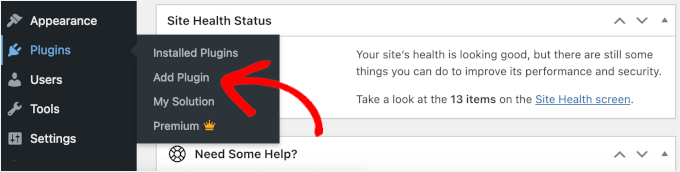
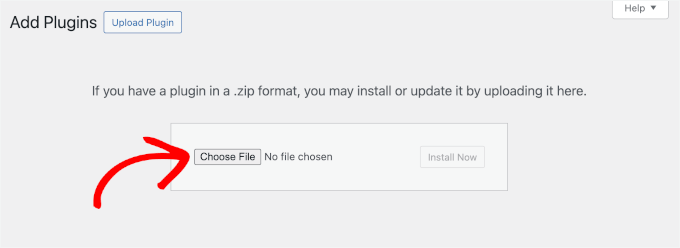
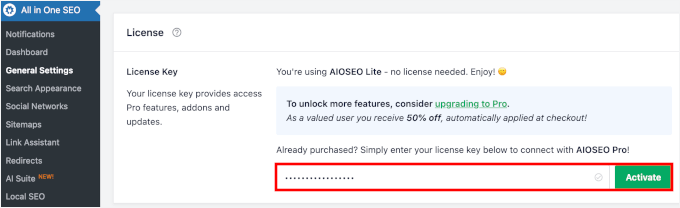
The installation proceeds via the WordPress admin area by navigating to Plugins » Add New, clicking "Upload Plugin," choosing the AIOSEO Pro zip file, and then clicking "Install Now" followed by "Activate." Upon activation, a new AIOSEO menu appears in the WordPress dashboard. The final part of this step involves navigating to AIOSEO » General Settings to input and activate the license key, granting access to the full suite of SEO functionalities.
Step 2: Activating the Link Assistant Feature
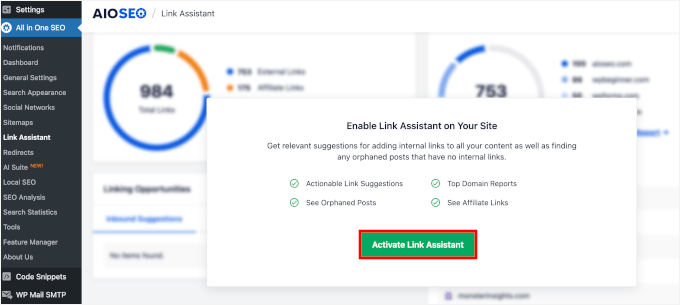
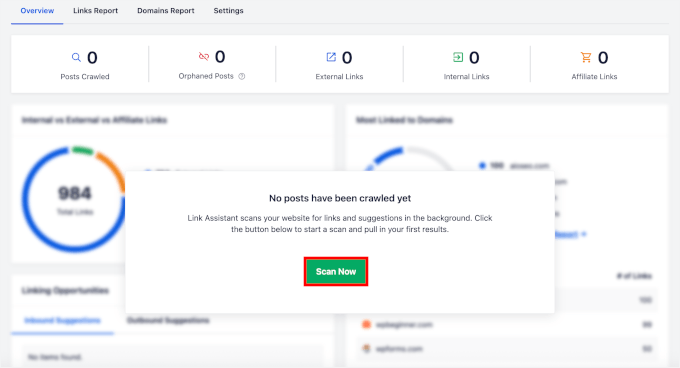
Once AIOSEO is installed and licensed, the next crucial step is enabling the Link Assistant feature. This is achieved by heading to AIOSEO » Link Assistant from the WordPress dashboard and clicking "Activate Link Assistant" if it’s not already enabled. A subsequent pop-up modal will prompt a content scan. Clicking "Scan Now" initiates AIOSEO’s background analysis of the site’s internal link structure, creating a comprehensive map of how pages are interconnected. For larger websites, this process may take several minutes, with a progress indicator showing the scan status.
Step 3: Identifying Orphan Pages on Your WordPress Site
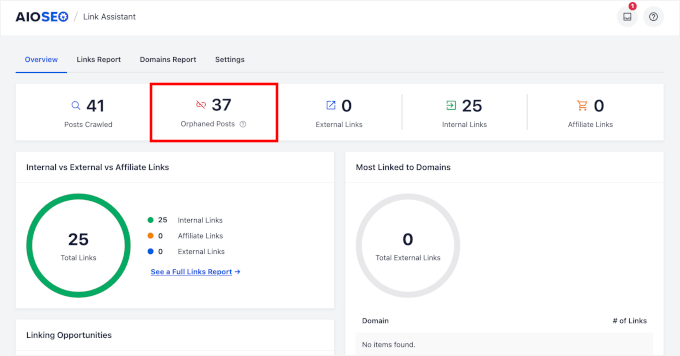
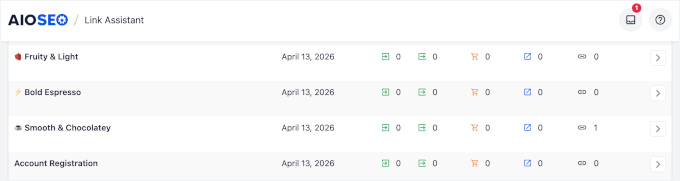
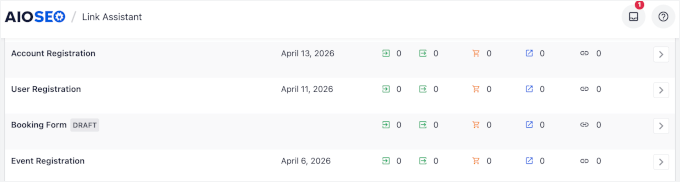
With Link Assistant active and the scan complete, administrators can now pinpoint the orphaned content. Navigating to AIOSEO » Link Assistant and then selecting the "Orphaned Posts" tab reveals a detailed list of every page and post on the site lacking internal links. This list typically includes:
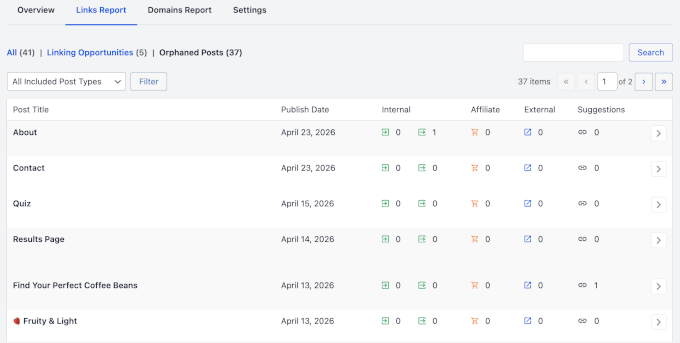
- The post or page title.
- Its URL.
- The content type (e.g., post, page, product).
- The date it was published.
- The author.
This consolidated view provides a clear inventory of all isolated content, forming the basis for the subsequent strategic decisions.
Step 4: Strategic Prioritization of Orphan Pages for Remediation
Before embarking on a mass linking campaign, a critical assessment of the identified orphan pages is paramount. Not all orphan pages warrant the same remedial action; indiscriminate linking can be counterproductive. The objective is to discern which pages hold genuine value and should be reconnected, and which are better candidates for deletion or redirection. Prioritization should focus on content known to be valuable, such as core product pages, high-performing blog posts, or previously promoted content. A systematic approach, perhaps involving a simple spreadsheet to log each page, its content type, and the proposed action (fix, redirect, or remove), streamlines this process.
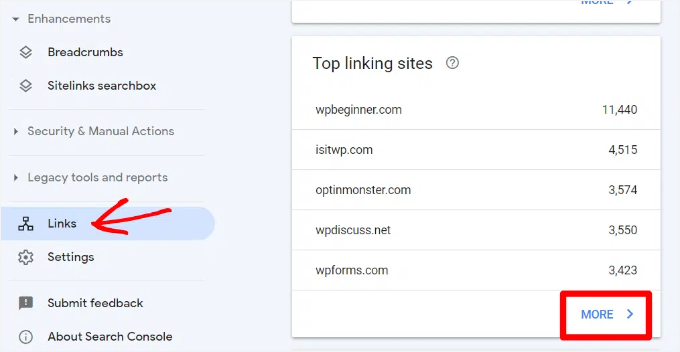
- Prioritizing Pages with Existing Backlinks: Pages that have external backlinks from other reputable websites are particularly valuable. These backlinks contribute "link equity" to the site. Reconnecting such an orphaned page internally ensures this valuable equity can flow throughout the rest of the site, enhancing overall domain authority. Tools like Google Search Console’s "Top linking sites" report or third-party SEO tools (e.g., Semrush) can identify these external links. Any orphaned page with existing backlinks should be marked for immediate remediation.
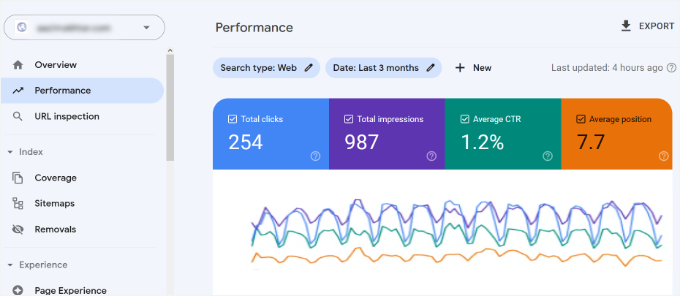
- Checking for Search Volume or Existing Rankings: Some orphan pages might already be attracting a minimal amount of organic traffic, even without internal links. This is a strong indicator of latent potential. Google Search Console’s "Performance" report can reveal if any orphaned pages are appearing in search results, highlighting content that, with proper internal linking, could achieve significantly higher visibility.
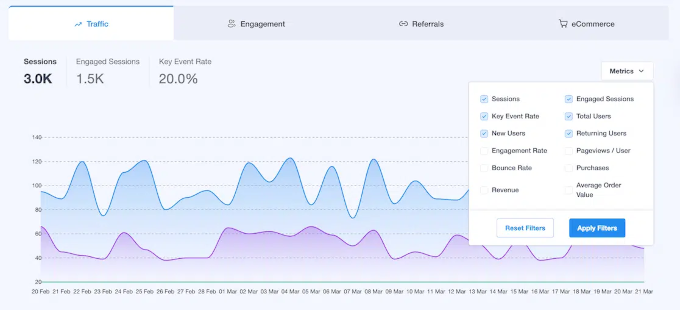
- Assessing On-Site Traffic with Analytics: While Google Search Console provides insights into search performance, understanding user behavior on a page requires analytics. Plugins like MonsterInsights integrate Google Analytics data directly into the WordPress dashboard, allowing administrators to cross-reference the orphan list with actual page visit data. An orphan page that continues to draw steady traffic despite its isolation is a prime candidate for reconnection, as it demonstrates inherent user interest. Conversely, pages with negligible traffic might be better candidates for redirection or removal.
- Considering Revenue Potential: Not all content contributes equally to a business’s bottom line. Product pages, service descriptions, and high-converting landing pages that directly support business objectives should be prioritized for internal linking over general informational blog posts. Integrating these pages into the main site structure ensures they receive maximum visibility and link equity.
- Identifying Duplicates and Thin Content: During the review, pages that are overly short ("thin content"), outdated, or substantially similar to other content on the site should be flagged. These pages typically do not benefit from internal links and are often better managed through other strategies, such as content consolidation, redirection, or removal, to avoid diluting content quality and potential duplicate content penalties.
Step 5: Implementing Fixes for Priority Orphan Pages
The actual process of re-establishing connections for priority orphan pages is significantly simplified by AIOSEO’s Link Assistant, which automatically suggests relevant internal links.
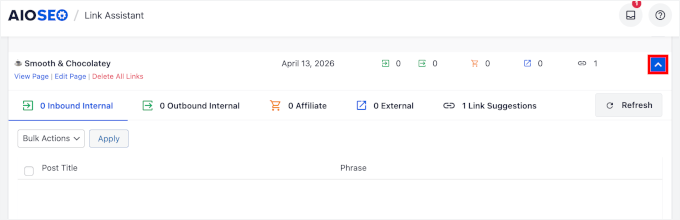
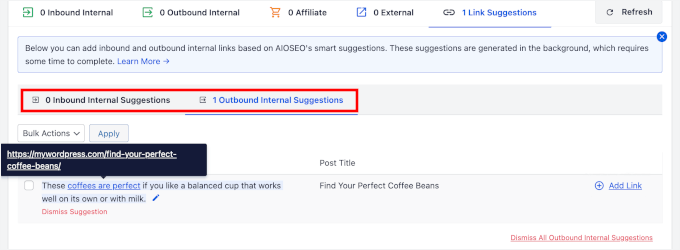
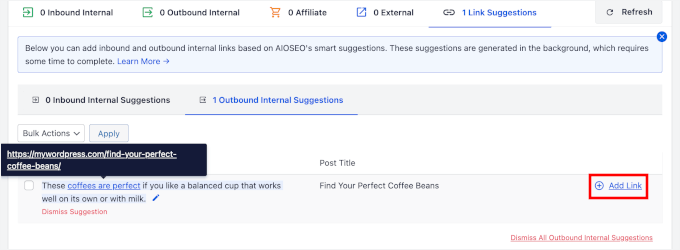
From the "Orphaned Posts" tab in AIOSEO, selecting a page (by clicking its title or the arrow icon) reveals a list of suggested internal links from other posts and pages on the site. These suggestions are algorithmically generated based on content relevance, ensuring that the added links are contextually appropriate and valuable to readers. AIOSEO typically offers two types of suggestions:
- Inbound Link Suggestions: These are recommendations for existing posts or pages that should link to the orphaned page.
- Outbound Link Suggestions: These are recommendations for links that could be added from the orphaned page to other relevant content on the site.
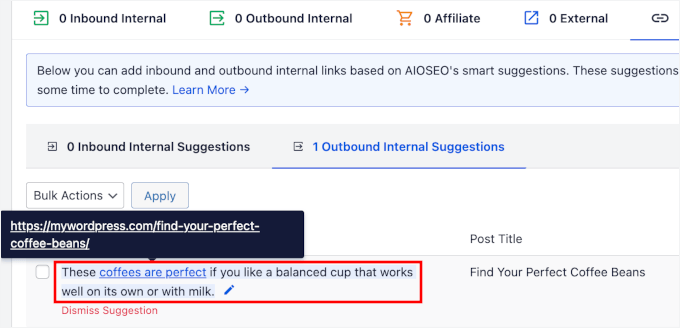
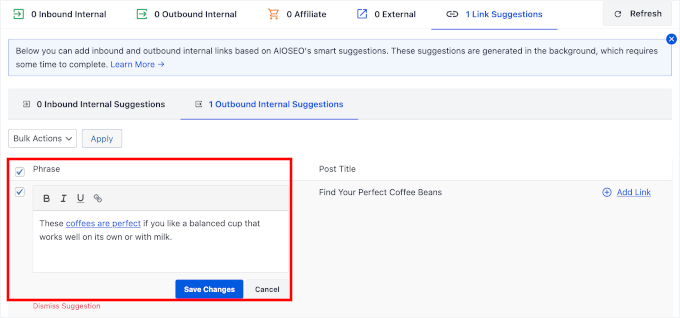
Before finalizing a link, it is advisable to review and, if necessary, edit the suggested anchor text – the clickable words of the link. AIOSEO provides an option to edit anchor text, allowing administrators to ensure it reads naturally within the context and accurately describes the linked page. Descriptive, relevant anchor text not only enhances user experience but also provides valuable signals to search engines about the linked content’s topic. After reviewing, clicking "Save Changes" updates the anchor text.
To apply a suggested link, simply click the "Add Link" button next to the desired suggestion. AIOSEO automatically inserts the internal link into the source post, eliminating the need to manually open the content editor. A confirmation pop-up ensures intentional application of the changes.
For high-value orphan pages, beyond adding contextual links within the body of other posts, it is often beneficial to integrate them more permanently into the site’s primary navigation. This could involve adding them to the main navigation menu or assigning them to relevant categories. A menu link, for instance, provides a consistent pathway to the page from every other page on the site, significantly boosting its discoverability for both users and search engines.
AIOSEO’s Link Assistant also extends its suggestions to affiliate links (if managed via plugins like ThirstyAffiliates) and external links. Adding relevant external links to authoritative external sources can enhance a site’s E-E-A-T (Experience, Expertise, Authoritativeness, Trustworthiness) signals, providing additional context and credibility for the content.
While adding internal links is crucial, moderation is key. Over-linking a single page can dilute link equity and appear unnatural to search engines. The goal is to establish genuinely relevant connections that enhance reader experience and content flow, rather than simply maximizing link count.
Upon completion, visiting the actual blog post or page confirms the successful integration of the new internal links, marking the transformation of an isolated page into a connected part of the website’s ecosystem.
Alternative Methods for Orphan Page Identification
While AIOSEO’s Link Assistant offers the most streamlined approach, alternative methods exist for identifying orphan pages, particularly for those not utilizing the plugin or seeking cross-verification. These methods primarily focus on identification, with the subsequent remediation steps remaining consistent with the AIOSEO process.
- Google Search Console: The "Coverage" report in Google Search Console can highlight pages that are "discovered – currently not indexed" or "crawled – currently not indexed." While not exclusively orphan pages, many pages in these categories often lack internal links. Cross-referencing these URLs with a list of all published pages can help identify orphans.
- XML Sitemaps: Comparing the URLs listed in your XML sitemap (which typically includes all pages you want indexed) against a list of all pages discovered by a website crawler can reveal discrepancies. Pages in the sitemap but not found by the crawler are likely orphans.
- Third-Party SEO Tools: Tools like Semrush, Ahrefs, Screaming Frog, or Sitebulb offer comprehensive site crawling capabilities. These tools can generate a list of all discoverable URLs and identify those with zero incoming internal links, effectively pinpointing orphan pages.
- Manual Review: For smaller websites, a laborious manual review of content can sometimes reveal oversights in internal linking. This method is highly inefficient for larger sites.
These alternative methods primarily serve the identification phase. The subsequent steps of prioritizing and fixing (or redirecting/removing) orphan pages would still involve a similar strategic approach as outlined with AIOSEO. For a broader site health check, utilizing a free SEO audit tool can help uncover other issues alongside orphan pages.
Strategic Management of Orphan Pages: Beyond Linking
Not every orphan page necessitates the addition of internal links. A nuanced approach to orphan page management often involves alternative strategies based on content quality and purpose:
- Redirection (301 Redirects): For outdated, low-value, or duplicate content that still receives some traffic or backlinks, a 301 (permanent) redirect is often the best solution. This directs users and search engine bots to a more relevant, updated, or consolidated page, preserving any existing link equity and improving user experience.
- Noindexing: Pages created for specific, temporary campaigns (e.g., promotional landing pages), private content, or content intentionally excluded from search results should be "noindexed." This instructs search engines not to include the page in their index, preventing it from appearing in search results while allowing it to remain accessible via direct URL.
- Deletion (with 404 Handling): Content that is genuinely obsolete, irrelevant, or contributes negatively to the site (e.g., very thin content with no value) should be deleted. When deleting, it’s crucial to ensure a 404 (Not Found) status code is returned, signaling to search engines that the page no longer exists. If any external links point to the deleted page, a 301 redirect to a relevant alternative is preferable to a 404.
- Content Improvement/Consolidation: For valuable but underperforming orphan pages, an alternative to simple linking is to first improve the content. This could involve updating information, expanding its depth, or even consolidating it with other related, higher-performing content, followed by a 301 redirect from the old URL to the new, enhanced version.
Maintaining Site Health: An Ongoing Audit Checklist
Orphan pages are not a one-time fix; they are an ongoing challenge in dynamic websites. New orphans can emerge with every new publication, site redesign, or migration. Regular audits are therefore essential to maintain optimal SEO performance. A recommended audit checklist includes:
- Scheduled Orphan Page Scans: Conduct an AIOSEO Link Assistant scan (or equivalent) at least quarterly, or immediately following any major site changes.
- Review of New Content: Ensure all newly published posts and pages are intentionally linked from relevant existing content and, if appropriate, added to navigation menus.
- Post-Migration Checks: After any site migration or URL restructuring, thoroughly check for broken links and new orphan pages.
- Backlink Monitoring: Regularly monitor new backlinks using tools like Google Search Console. If a backlink points to an orphan page, prioritize its reconnection.
- Traffic Analysis: Periodically review Google Analytics and Search Console data for pages receiving traffic but lacking internal links.
- Content Quality Assessment: Identify and address thin, duplicate, or outdated content, opting for redirection, noindexing, or deletion rather than simply adding internal links.
- XML Sitemap Verification: Ensure your XML sitemap accurately reflects your desired indexable pages and doesn’t inadvertently include pages you wish to be orphaned or noindexed.
By adhering to this checklist a few times annually, website administrators can proactively prevent orphan pages from undermining their search rankings, transforming them from SEO liabilities into assets that contribute to overall site authority and user engagement.
Frequently Asked Questions Regarding Orphan Pages
- Why are orphan pages bad for SEO? Orphan pages hinder SEO because search engines struggle to discover, crawl, and rank content without internal links. They also receive no link equity, making them less competitive in search results.
- How often should I check for orphan pages? Check at least quarterly, or after any significant site structure changes, navigation updates, or content migrations. More frequent checks are advisable for sites with high publishing velocity.
- Can I fix orphan pages without a plugin? Yes, by manually reviewing content and adding links via the WordPress editor. However, this is time-consuming and error-prone. Plugins like AIOSEO’s Link Assistant automate and streamline the process significantly.
- Are orphan pages the same as dead-end pages? No. An orphan page has no internal links to it. A dead-end page has no internal links from it. Both are internal linking issues requiring attention, as dead-end pages impede user navigation and prevent link equity flow.
- Do I need to fix every orphan page? No. Thin content, duplicate pages, or intentionally orphaned pages (e.g., specific ad landing pages) are better handled by removal, redirection, or noindexing rather than adding internal links. Focus on valuable content with traffic potential, existing backlinks, or direct revenue impact.
- What’s a good ratio of internal links per page? There’s no fixed rule. Aim for internal links where they genuinely assist the reader in finding related content. Most SEO experts suggest a handful of relevant internal links per post, avoiding excessive linking that can dilute link equity or appear spammy.
- Will orphan pages affect my AI search visibility? Yes. AI-powered search tools (like ChatGPT, Perplexity, and Google’s AI Overviews) rely on well-indexed, well-connected content to retrieve accurate information. Pages disconnected from your site’s structure are often not indexed, making them invisible to these AI models. Fixing orphan pages ensures your content is discoverable across both traditional and AI-driven search environments.
By proactively managing orphan pages, website owners can significantly enhance their WordPress SEO, improve user experience, and ensure their valuable content is effectively discovered and ranked across the evolving search landscape.

